xv6中创建syscall
- 分类
- 未分类
xv6的启动过程大致可以分为BIOS->bootloader->kernel,三个环节,本小节主要讲述bootloader的相关内容。
BIOS的作用是将磁盘的第一个扇区的内容移入到地址为0x7c00的位置,然后把控制权交给这份内容。这一份内容就是bootloader。
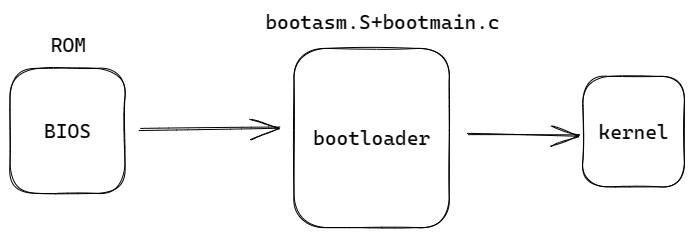
bootloader由bootasm.S和bootmain.c组成,所以接下来主要分析这两个文件的代码。
bootasm.S
代码不算长,我们先贴上完整的代码:
bootasm.S
#include "asm.h"
#include "memlayout.h"
#include "mmu.h"

# Start the first CPU: switch to 32-bit protected mode, jump into C.
# The BIOS loads this code from the first sector of the hard disk into
# memory at physical address 0x7c00 and starts executing in real mode
# with %cs=0 %ip=7c00.

.code16                       # Assemble for 16-bit mode
.globl start
start:
  cli                         # BIOS enabled interrupts; disable

  # Zero data segment registers DS, ES, and SS.
  xorw    %ax,%ax             # Set %ax to zero
  movw    %ax,%ds             # -> Data Segment
  movw    %ax,%es             # -> Extra Segment
  movw    %ax,%ss             # -> Stack Segment

  # Physical address line A20 is tied to zero so that the first PCs
  # with 2 MB would run software that assumed 1 MB.  Undo that.
seta20.1:
  inb     $0x64,%al               # Wait for not busy
  testb   $0x2,%al
  jnz     seta20.1

  movb    $0xd1,%al               # 0xd1 -> port 0x64
  outb    %al,$0x64

seta20.2:
  inb     $0x64,%al               # Wait for not busy
  testb   $0x2,%al
  jnz     seta20.2

  movb    $0xdf,%al               # 0xdf -> port 0x60
  outb    %al,$0x60

  # Switch from real to protected mode.  Use a bootstrap GDT that makes
  # virtual addresses map directly to physical addresses so that the
  # effective memory map doesn't change during the transition.
  lgdt    gdtdesc
  movl    %cr0, %eax
  orl     $CR0_PE, %eax
  movl    %eax, %cr0

//PAGEBREAK!
  # Complete the transition to 32-bit protected mode by using a long jmp
  # to reload %cs and %eip.  The segment descriptors are set up with no
  # translation, so that the mapping is still the identity mapping.
  ljmp    $(SEG_KCODE<<3), $start32

.code32  # Tell assembler to generate 32-bit code now.
start32:
  # Set up the protected-mode data segment registers
  movw    $(SEG_KDATA<<3), %ax    # Our data segment selector
  movw    %ax, %ds                # -> DS: Data Segment
  movw    %ax, %es                # -> ES: Extra Segment
  movw    %ax, %ss                # -> SS: Stack Segment
  movw    $0, %ax                 # Zero segments not ready for use
  movw    %ax, %fs                # -> FS
  movw    %ax, %gs                # -> GS

  # Set up the stack pointer and call into C.
  movl    $start, %esp
  call    bootmain

  # If bootmain returns (it shouldn't), trigger a Bochs
  # breakpoint if running under Bochs, then loop.
  movw    $0x8a00, %ax            # 0x8a00 -> port 0x8a00
  movw    %ax, %dx
  outw    %ax, %dx
  movw    $0x8ae0, %ax            # 0x8ae0 -> port 0x8a00
  outw    %ax, %dx
spin:
  jmp     spin

# Bootstrap GDT
.p2align 2                                # force 4 byte alignment
gdt:
  SEG_NULLASM                             # null seg
  SEG_ASM(STA_X|STA_R, 0x0, 0xffffffff)   # code seg
  SEG_ASM(STA_W, 0x0, 0xffffffff)         # data seg

gdtdesc:
  .word   (gdtdesc - gdt - 1)             # sizeof(gdt) - 1
  .long   gdt                             # address gdt
接下来我们大致分析一下:
-
先是关闭了中断,定义了下面的函数名(start),然后做了一些初始化工作。
.code16 # Assemble for 16-bit mode .globl start start: cli # BIOS enabled interrupts; disable # Zero data segment registers DS, ES, and SS. xorw %ax,%ax # Set %ax to zero movw %ax,%ds # -> Data Segment movw %ax,%es # -> Extra Segment movw %ax,%ss # -> Stack Segment -
接下来是和IO端口做一些交互,因为一些历史原因,此时的CPU只能访问1M的地址空间,我们需要通过下面的操作打开A20地址线,才可以访问高于1M的物理空间。
seta20.1: inb $0x64,%al # Wait for not busy testb $0x2,%al jnz seta20.1 movb $0xd1,%al # 0xd1 -> port 0x64 outb %al,$0x64 seta20.2: inb $0x64,%al # Wait for not busy testb $0x2,%al jnz seta20.2 movb $0xdf,%al # 0xdf -> port 0x60 outb %al,$0x60 -
下一步载入
GDT(全局表示符表)并且开启保护模式,我简单介绍一下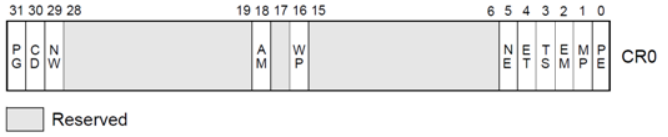
这是CR0寄存器,第0位为1是表示开启保护模式,下面这三行汇编将最低为置1,开始保护模式。
  movl    %cr0, %eax
  orl     $CR0_PE, %eax
movl %eax, %cr0其中$CR0_PE在mmu.h中
#define CR0_PE 0x00000001 // Protection Enable关于保护模式的具体细节请自己了解,下面继续分析GDT。
可以看到下面一行汇编将GDT的信息装载到GDTR这个寄存器中,这个寄存器低16位存储段长,高32位存储GDT的起始地址。我们结合下面的gdtdesc,发现这一段内容首先定义了一个word,用两个字节表示段长,后面又定义了一个long,保存GDT的地址,即符号gdt所在的位置。

gdt:
  SEG_NULLASM                             # null seg
  SEG_ASM(STA_X|STA_R, 0x0, 0xffffffff)   # code seg
  SEG_ASM(STA_W, 0x0, 0xffffffff)         # data seg

gdtdesc:
  .word   (gdtdesc - gdt - 1)             # sizeof(gdt) - 1
.long gdt # address gdt我们再继续看SEG_NULLASM和下面的内容,从注释可以发现这一段内容定义了三个段描述符,第一个是空段,后面分别是代码段和数据段。上面用到的宏定义在asm.h中。
#define SEG_NULLASM                                             \
        .word 0, 0;                                             \
        .byte 0, 0, 0, 0

// The 0xC0 means the limit is in 4096-byte units
// and (for executable segments) 32-bit mode.
#define SEG_ASM(type,base,lim)                                  \
        .word (((lim) >> 12) & 0xffff), ((base) & 0xffff);      \
        .byte (((base) >> 16) & 0xff), (0x90 | (type)),         \
                (0xC0 | (((lim) >> 28) & 0xf)), (((base) >> 24) & 0xff)

#define STA_X     0x8       // Executable segment
#define STA_W     0x2       // Writeable (non-executable segments)
#define STA_R     0x2       // Readable (executable segments)
在分析之前,我们先看看段描述符的结构:
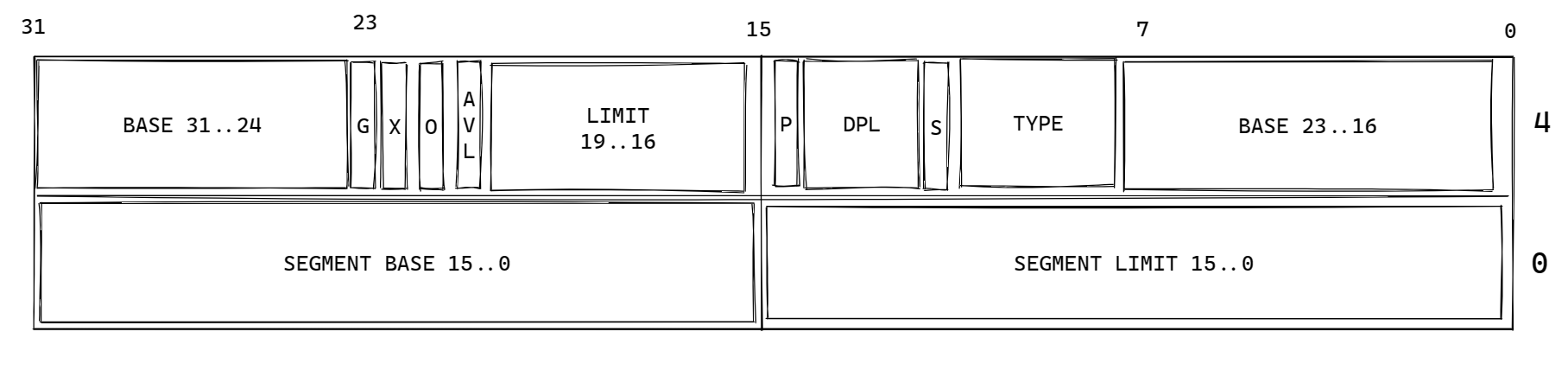
SEG_NULL很简单,定义了一个空段,内容都是0,我们再来看看SEG_ASM。首先后面跟着两个word的内容,可以发现分别对应着段描述符的低32位,分别是段限长的前16位(lim的高20位为段限长)和段基址的前16位。后面则分开定义了4个字节的内容,第一个字节是段基址的第二部分,第二个字节指定了type,并将P和S赋值为1,第三个字节指定段限长的高4位的同时将G和X赋值为1,这将启动大页模式,最后一个字节则指定剩余的段基址部分。
-
下一步是一个跳转指令,也是完成了16位到32位的转换的一步,跳转指令的第一个部分指定段寄存器cs的值,第二个部分指定ip寄存器的值,其中
SEG_KCODE定义在mmu.h,表示代码段,这里的值将作为GDT的索引,在使用时要将该值左移三位,因为段寄存器的低三位表示其它信息,后面的start32则是一个标号,在跳转指令下方。// various segment selectors. #define SEG_KCODE 1 // kernel code #define SEG_KDATA 2 // kernel data+stack #define SEG_UCODE 3 // user code #define SEG_UDATA 4 // user data+stack #define SEG_TSS 5 // this process's task state -
接下来是在32位模式下设置各个段的值,其中
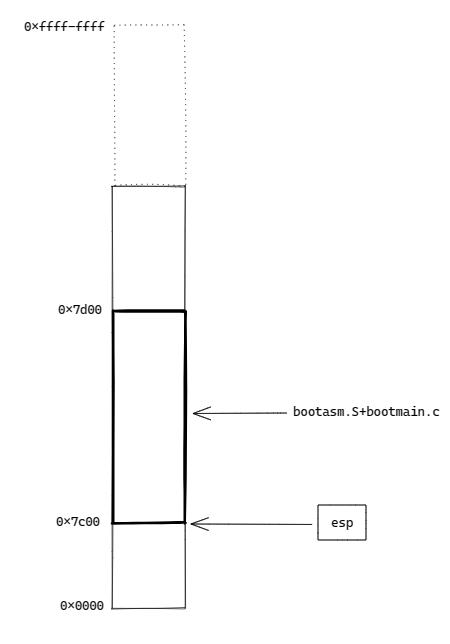
ds,es,ss设置为数据段,fs和gs则设置为空段(它们的索引是0,在GDT中第0个段是空段),最后将栈基址寄存器esp设置为start,也就是bootasm.S装载的位置,即0x7c00,最后跳转到bootmain.c。
到现在bootasm.S的部分就完成了,现在内存中的情况如下图所示:
bootmain.c
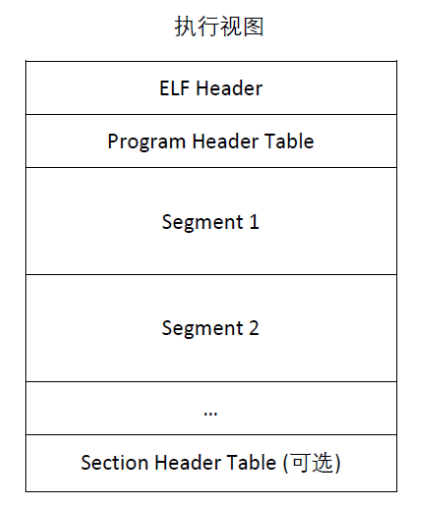
相较于bootasm.S,bootmain.c所做的事并没有那么多,说的简单一点就是一节事——将内核载入到内存中。内核文件是一个elf文件,载入内核实际上就是载入elf文件,所以这一部分内容要求对ELF格式的文件有一定的了解,下面是完整的代码和ELF文件格式:
// Boot loader.
//
// Part of the boot block, along with bootasm.S, which calls bootmain().
// bootasm.S has put the processor into protected 32-bit mode.
// bootmain() loads an ELF kernel image from the disk starting at
// sector 1 and then jumps to the kernel entry routine.

#include "types.h"
#include "elf.h"
#include "x86.h"
#include "memlayout.h"

#define SECTSIZE  512

void readseg(uchar*, uint, uint);

void
bootmain(void)
{
  struct elfhdr *elf;
  struct proghdr *ph, *eph;
  void (*entry)(void);
  uchar* pa;

  elf = (struct elfhdr*)0x10000;  // scratch space

  // Read 1st page off disk
  readseg((uchar*)elf, 4096, 0);

  // Is this an ELF executable?
  if(elf->magic != ELF_MAGIC)
    return;  // let bootasm.S handle error

  // Load each program segment (ignores ph flags).
  ph = (struct proghdr*)((uchar*)elf + elf->phoff);
  eph = ph + elf->phnum;
  for(; ph < eph; ph++){
    pa = (uchar*)ph->paddr;
    readseg(pa, ph->filesz, ph->off);
    if(ph->memsz > ph->filesz)
      stosb(pa + ph->filesz, 0, ph->memsz - ph->filesz);
  }

  // Call the entry point from the ELF header.
  // Does not return!
  entry = (void(*)(void))(elf->entry);
  entry();
}

void
waitdisk(void)
{
  // Wait for disk ready.
  while((inb(0x1F7) & 0xC0) != 0x40)
    ;
}

// Read a single sector at offset into dst.
void
readsect(void *dst, uint offset)
{
  // Issue command.
  waitdisk();
  outb(0x1F2, 1);   // count = 1
  outb(0x1F3, offset);
  outb(0x1F4, offset >> 8);
  outb(0x1F5, offset >> 16);
  outb(0x1F6, (offset >> 24) | 0xE0);
  outb(0x1F7, 0x20);  // cmd 0x20 - read sectors

  // Read data.
  waitdisk();
  insl(0x1F0, dst, SECTSIZE/4);
}

// Read 'count' bytes at 'offset' from kernel into physical address 'pa'.
// Might copy more than asked.
void
readseg(uchar* pa, uint count, uint offset)
{
  uchar* epa;

  epa = pa + count;

  // Round down to sector boundary.
  pa -= offset % SECTSIZE;

  // Translate from bytes to sectors; kernel starts at sector 1.
  offset = (offset / SECTSIZE) + 1;

  // If this is too slow, we could read lots of sectors at a time.
  // We'd write more to memory than asked, but it doesn't matter --
  // we load in increasing order.
  for(; pa < epa; pa += SECTSIZE, offset++)
    readsect(pa, offset);
}
下面就主要介绍bootmain这个函数。
- 先读入除了第一个扇区以外的前八个扇区。
readseg((uchar*)elf, 4096, 0);- 然后检查文件是否是elf格式。
  if(elf->magic != ELF_MAGIC)
return; // let bootasm.S handle error- 然后找到程序头的位置,并根据程序头载入全部的段。
  ph = (struct proghdr*)((uchar*)elf + elf->phoff);
  eph = ph + elf->phnum;
  for(; ph < eph; ph++){
    pa = (uchar*)ph->paddr;
    readseg(pa, ph->filesz, ph->off);
    if(ph->memsz > ph->filesz)
      stosb(pa + ph->filesz, 0, ph->memsz - ph->filesz);
}- 最后找到入口函数,执行入口函数,自此开始,控制权交给内核。
  entry = (void(*)(void))(elf->entry);
  entry();
bootloader的工作到这里就完成了,接下来就是kernel的天下了。