hexo部署到自己的云服务器
- 分类
- 未分类
文章目录 7 节
开始之前
本文不会涉及hexo的使用,请先去了解hexo的基本使用和部署,也可以参考我的文章hexo建站简明教程。
本教程基于Centos7.6,如果是其它linux发行版请自行修改相应命令。
构建服务器环境
安装git和nginx
yum install git
yum install nginx
# ubuntu
apt install git
apt install nginx
配置git仓库
下面的用户和目录都可以自己定义,但注意要保持上下文统一
useradd hexo # 添加一个用户,其实也不是必须的
chown -R hexo:hexo /home/hexo # 把目录的归属权交给hexo用户
cd home
chmod o+x hexo # 默认创建的hexo文件夹只有hexo有执行权限,nginx用户没有执行权限,将会导致403
cd hexo
mkdir -p /home/hexo/www/blog # 创建博客部署目录
git init --bare blog.git # 裸仓库,没有工作空间
cd /home/hexo/blog.git/hooks
vim post-receive # 创建钩子文件
然后我们添加如下内容
#!/bin/sh
git --work-tree=/home/hexo/www/blog --git-dir=/home/hexo/blog.git checkout -f注意#!/bin/sh不要漏了,这里声明了下面脚本执行器的位置。
work-tree:工作目录
git-dir:git仓库目录
chmod +x post-receive # 给与执行权限远程的git仓库大致配置就是如此
配置ssh
在你的windows电脑上生成ssh公钥密钥(需要安装git)
ssh-keygen下面会让你输入公钥和密钥的保存位置和密码等,如果不想输入可以按回车,这将使用默认的存放位置和空的密码。
默认存在在你的C:\Users\用户名\.ssh目录下
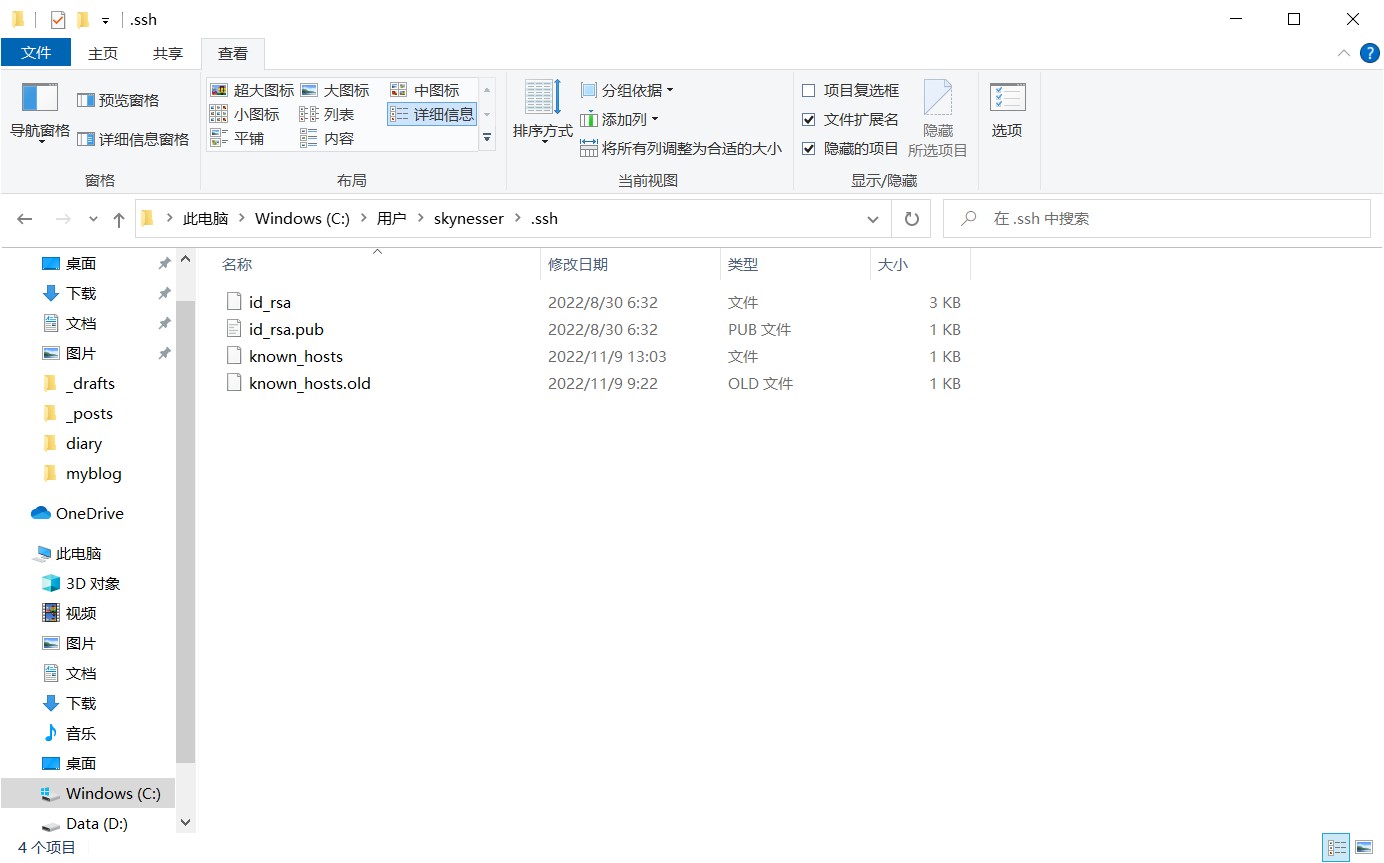
这里建议用支持ftp的第三方工具直接操作。
把id_rsa.pub放到服务器的/home/hexo/.ssh/authorized_keys文件中(如果文件中已经存在公钥,追加在文件下面即可)。
如果不使用第三方工具,使用powershell用root登录到服务器上(hexo用户目前没有设置密码),然后上传到服务器中。
ssh root@ip # 这里的ip要换成你的服务器ip
scp 本地文件位置 root@ip:/home/hexo/.ssh/authorized_keys
配置完可以测试一下
ssh hexo@ip配置成功应该可以直接登录
将本地hexo博客上传到服务器
修改博客目录下的_config.yaml文件
deploy:
  type: git
  repository: hexo@ip:/home/hexo/blog.git
  branch: master
将deploy部分修改如上,然后使用部署命令
hexo g
hexo d现在我们可以在/home/hexo/www/blog目录下看到上传的文件
配置nginx
最后使用nginx反向代理就可以实现访问了。
使用http
/etc/nginx/nginx.conf
# For more information on configuration, see:
#   * Official English Documentation: http://nginx.org/en/docs/
#   * Official Russian Documentation: http://nginx.org/ru/docs/

user nginx;
worker_processes auto;
error_log /var/log/nginx/error.log;
pid /run/nginx.pid;

# Load dynamic modules. See /usr/share/doc/nginx/README.dynamic.

events {
    worker_connections 1024;
}

http {
    log_format  main  '$remote_addr - $remote_user [$time_local] "$request" '
                      '$status $body_bytes_sent "$http_referer" '
                      '"$http_user_agent" "$http_x_forwarded_for"';

    access_log  /var/log/nginx/access.log  main;

    sendfile            on;
    tcp_nopush          on;
    tcp_nodelay         on;
    keepalive_timeout   65;
    types_hash_max_size 4096;

    include             /etc/nginx/mime.types;
    default_type        application/octet-stream;
    # Load modular configuration files from the /etc/nginx/conf.d directory.
    # See http://nginx.org/en/docs/ngx_core_module.html#include
    # for more information.

    server {
        listen       80;
        listen       [::]:80;
        server_name  _;
        root         /home/hexo/www/blog;
        charset utf8;
        location / {
        }

        error_page 404 /404.html;
        location = /404.html {
        }

        error_page 500 502 503 504 /50x.html;
        location = /50x.html {
        }
    }
}
如果要配置https
/etc/nginx/nginx.conf
# For more information on configuration, see:
#   * Official English Documentation: http://nginx.org/en/docs/
#   * Official Russian Documentation: http://nginx.org/ru/docs/

user nginx;
worker_processes auto;
error_log /var/log/nginx/error.log;
pid /run/nginx.pid;

# Load dynamic modules. See /usr/share/doc/nginx/README.dynamic.

events {
    worker_connections 1024;
}

http {
    log_format  main  '$remote_addr - $remote_user [$time_local] "$request" '
                      '$status $body_bytes_sent "$http_referer" '
                      '"$http_user_agent" "$http_x_forwarded_for"';

    access_log  /var/log/nginx/access.log  main;

    sendfile            on;
    tcp_nopush          on;
    tcp_nodelay         on;
    keepalive_timeout   65;
    types_hash_max_size 4096;

    include             /etc/nginx/mime.types;
    default_type        application/octet-stream;
    # Load modular configuration files from the /etc/nginx/conf.d directory.
    # See http://nginx.org/en/docs/ngx_core_module.html#include
    # for more information.

    server {
        listen       443 ssl http2;
        listen       [::]:443 ssl http2;
        server_name  _;
        root         /home/hexo/www/blog;
        charset utf8;
        ssl_certificate     证书所在位置;
        ssl_certificate_key 证书的密钥所在位置;
        ssl_session_cache shared:SSL:1m;
        ssl_session_timeout  10m;
        ssl_ciphers HIGH:!aNULL:!MD5;
        ssl_prefer_server_ciphers on;
        location / {
        }

        error_page 404 /404.html;
        location = /404.html {
        }

        error_page 500 502 503 504 /50x.html;
        location = /50x.html {
        }
    }

}
配置好后我们重新加载一下nginx
nginx -t # 检查nginx配置文件语法是否正确
systemctl start nginx # 如果没有启动nginx
systemctl reload nginx # 重新加载配置文件
最后测试一下
# http
curl localhost
# https
curl https://域名