『springboot』shiro鉴权
- 分类
- 未分类
文章目录 7 节
Shiro是什么
shiro是java的一个安全框架,关于它的优势和一些功能就不细讲了
Shiro的架构
先放一张经典的Shiro架构图
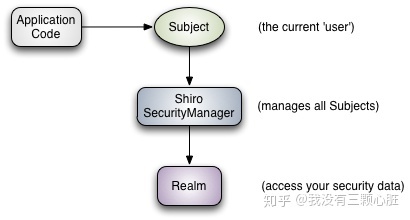
- Subject:可以理解为资源的请求者
- Shiro SecurityManager:作为一个中间的过度,管理着shiro各种资源
- Realm:存放着真正的认证和授权信息
快速入门
下面就是一个shiro在项目中应用的简单例子,因为是shiro的快速入门,所以shiro之外的其它技术如何使用包括sql语句的编写不会去具体讲解,所以建议开始前把代码拉下来
完整代码请访问仓库
jking412/java-example: 一些java的demo,主要是springboot整合框架的案例 (github.com)
数据库的设计
create table goods
(
    id    int auto_increment
        primary key,
    name  varchar(50) null,
    price int         null
)
    collate = utf8mb4_0900_ai_ci;

create table sys_permission
(
    permission_id   int auto_increment
        primary key,
    permission_name varchar(50)  not null,
    permission_desc varchar(100) not null,
    permission_url  varchar(100) not null
)
    collate = utf8mb4_0900_ai_ci;

create table sys_role
(
    role_id   int auto_increment
        primary key,
    role_name varchar(50)  not null,
    role_desc varchar(100) not null
)
    collate = utf8mb4_0900_ai_ci;

create table sys_role_permission
(
    role_id       int not null,
    permission_id int not null
)
    collate = utf8mb4_0900_ai_ci;

create table sys_user
(
    user_id       int auto_increment
        primary key,
    user_name     varchar(50) not null,
    user_password varchar(50) not null,
    user_salt     varchar(50) not null
)
    collate = utf8mb4_0900_ai_ci;

create table sys_user_role
(
    user_id int not null,
    role_id int not null
)
    collate = utf8mb4_0900_ai_ci;
我们需要六张表
五张表用于系统的安全管理
| 表名 | 作用 |
|---|---|
| sys_user | 用户信息 |
| sys_role | 角色 |
| sys_permission | 权限 |
| sys_role_permission | 角色和权限之间的关系 |
| sys_user_role | 用户于角色的关系 |
最后一张goods表用户测试,可以随意建
使用shiro
shiro的使用其实相当的简单,我们只需要配置好两个类即可
Realm配置
package com.example.shirotest.config;

import com.example.shirotest.entity.SysPermission;
import com.example.shirotest.entity.SysRole;
import com.example.shirotest.entity.UserInfo;
import com.example.shirotest.mapper.SysPermissionMapper;
import com.example.shirotest.mapper.UserInfoMapper;
import org.apache.shiro.authc.AuthenticationException;
import org.apache.shiro.authc.AuthenticationInfo;
import org.apache.shiro.authc.AuthenticationToken;
import org.apache.shiro.authc.SimpleAuthenticationInfo;
import org.apache.shiro.authz.AuthorizationInfo;
import org.apache.shiro.authz.SimpleAuthorizationInfo;
import org.apache.shiro.realm.AuthorizingRealm;
import org.apache.shiro.subject.PrincipalCollection;
import org.apache.shiro.util.ByteSource;
import org.springframework.beans.factory.annotation.Autowired;

import java.util.List;

public class ShiroRealm extends AuthorizingRealm {

    @Autowired
    private UserInfoMapper userInfoMapper;

    @Autowired
    private SysPermissionMapper sysPermissionMapper;

    @Override
    protected AuthorizationInfo doGetAuthorizationInfo(PrincipalCollection principalCollection) {
        UserInfo userInfo = (UserInfo) principalCollection.getPrimaryPrincipal();
        SimpleAuthorizationInfo simpleAuthorizationInfo = new SimpleAuthorizationInfo();
        for(SysRole role : userInfo.getRoles()){
            simpleAuthorizationInfo.addRole(role.getRole());
            List<SysPermission> sysPermissions = sysPermissionMapper.selectPermissionByRoleId(role.getId());
            for(SysPermission sysPermission : sysPermissions){
                simpleAuthorizationInfo.addStringPermission(sysPermission.getName());
            }
        }
        return simpleAuthorizationInfo;
    }

    @Override
    protected AuthenticationInfo doGetAuthenticationInfo(AuthenticationToken authenticationToken) throws AuthenticationException {
        String username = (String)authenticationToken.getPrincipal();
        UserInfo userInfo = userInfoMapper.findByUsername(username);
        if(username == null){
            return null;
        }
        SimpleAuthenticationInfo simpleAuthenticationInfo = new SimpleAuthenticationInfo(userInfo,
                userInfo.getPassword(),
                ByteSource.Util.bytes(userInfo.getSalt()),
                this.getName());
        return simpleAuthenticationInfo;
    }
}
认证和授权
认证是针对某个用户的,认证成功可以认为是登录成功
虽然用户已经经过了登录,但用户并不对所有的资源具有操作权限,所以我们需要对用户进行授权
授权是针对具体的某个操作的,给予用户具体的操作权限
doGetAuthenticationInfo()
完成认证的函数,在我们调用登录的方法时,我们可以通过authenticationToken.getPrincipal()取得token中的username,我们可以通过这个username来取出dao层中的用户相关数据,并且把从数据库中取出的数据放到shiro中,shiro会把密码和token中的密码进行自动比对。
这里是在UserController中的登录代码
UsernamePasswordToken token = new UsernamePasswordToken(map.get("username").toString(),map.get("password").toString());
subject.login(token);
userInfo.getSalt()
这里是用户的盐,我们在存放用户密码时会对用户的密码进行加密,但是直接加密的方式还是不够安全,我们可以通过给密码添加上一段随机生成的字符再加密的方式提高用户密码的安全性
doGetAuthorizationInfo()
完成授权的函数,我们查询出用户的所有角色,然后查询角色拥有的权限,然后最后把这些数据都添加都shiro中
shiroconfig配置
package com.example.shirotest.config;


import org.apache.shiro.authc.credential.HashedCredentialsMatcher;
import org.apache.shiro.spring.security.interceptor.AuthorizationAttributeSourceAdvisor;
import org.apache.shiro.spring.web.ShiroFilterFactoryBean;
import org.apache.shiro.web.mgt.DefaultWebSecurityManager;
import org.springframework.aop.framework.autoproxy.DefaultAdvisorAutoProxyCreator;
import org.springframework.context.annotation.Bean;
import org.springframework.context.annotation.Configuration;
import org.apache.shiro.mgt.SecurityManager;

import java.util.LinkedHashMap;
import java.util.Map;

@Configuration
public class ShiroConfig {

    @Bean
    public ShiroFilterFactoryBean shirFilter(SecurityManager securityManager) {
        ShiroFilterFactoryBean shiroFilterFactoryBean = new ShiroFilterFactoryBean();
        shiroFilterFactoryBean.setSecurityManager(securityManager);

        Map<String,String> filterChainDefinitionMap = new LinkedHashMap<String,String>();

        // 配置不会被拦截的链接 顺序判断
        filterChainDefinitionMap.put("/static/**", "anon");
        // 配置退出 过滤器,其中的具体的退出代码Shiro已经替我们实现了
        filterChainDefinitionMap.put("/logout", "logout");
        // <!-- 过滤链定义,从上向下顺序执行,一般将/**放在最为下边 -->:这是一个坑呢,一不小心代码就不好使了;
        // <!-- authc:所有url都必须认证通过才可以访问; anon:所有url都都可以匿名访问-->
        filterChainDefinitionMap.put("/**", "authc");
        // 如果不设置默认会自动寻找Web工程根目录下的"/login.jsp"页面
        shiroFilterFactoryBean.setLoginUrl("/login");
        // 登录成功后要跳转的链接
//        shiroFilterFactoryBean.setSuccessUrl("/index");

        //未授权界面;
//        shiroFilterFactoryBean.setUnauthorizedUrl("/403");
        shiroFilterFactoryBean.setFilterChainDefinitionMap(filterChainDefinitionMap);
        return shiroFilterFactoryBean;

    }

    @Bean
    public HashedCredentialsMatcher hashedCredentialsMatcher() {
        HashedCredentialsMatcher hashedCredentialsMatcher = new HashedCredentialsMatcher();
        hashedCredentialsMatcher.setHashAlgorithmName("md5");
        hashedCredentialsMatcher.setHashIterations(2);
        return hashedCredentialsMatcher;
    }

    @Bean
    public SecurityManager securityManager(ShiroRealm shiroRealm) {
        DefaultWebSecurityManager securityManager = new DefaultWebSecurityManager();
        securityManager.setRealm(shiroRealm);
        return securityManager;
    }

    @Bean
    public ShiroRealm shiroRealm(){
        ShiroRealm shiroRealm = new ShiroRealm();
        shiroRealm.setCredentialsMatcher(hashedCredentialsMatcher());
        return shiroRealm;
    }

    @Bean
    public AuthorizationAttributeSourceAdvisor authorizationAttributeSourceAdvisor(SecurityManager securityManager) {
        AuthorizationAttributeSourceAdvisor authorizationAttributeSourceAdvisor = new AuthorizationAttributeSourceAdvisor();
        authorizationAttributeSourceAdvisor.setSecurityManager(securityManager);
        return authorizationAttributeSourceAdvisor;
    }


    /**
     * @description:解决权限注解不生效问题
     */
    @Bean
    public static DefaultAdvisorAutoProxyCreator getDefaultAdvisorAutoProxyCreator(){
        return new DefaultAdvisorAutoProxyCreator();
    }
}
这部分内容就是一些配置,配置了shiro需要的bean
值得一提的是最后两个bean是启用shiro的注解的,所以如果使用注解配置shiro的过程中一定要加上