(九)使用redis和captcha
- 分类
- 未分类
文章目录 8 节
开始前的准备
$ go get github.com/go-redis/redis/v8
$ go get github.com/mojocn/base64Captcha
开始编码
redis包
pkg/redis/redis.go
package redis

import (
   "context"
   "github.com/go-redis/redis/v8"
   "go-api-practice/pkg/logger"
   "sync"
   "time"
)

type RedisClient struct {
   Client  *redis.Client
   Context context.Context
}

var once sync.Once

var Redis *RedisClient

func ConnectRedis(address string, username string, password string, db int) {
   once.Do(func() {//确保函数只会被执行一次
      Redis = NewClient(address, username, password, db)
   })
}

func NewClient(address string, username string, password string, db int) *RedisClient {
   rds := &RedisClient{}
   rds.Context = context.Background()
   rds.Client = redis.NewClient(&redis.Options{
      Addr:     address,
      Username: username,
      Password: password,
      DB:       db,
   })
   err := rds.Ping()
   logger.LogIf(err)

   return rds
}

func (rds RedisClient) Ping() error {
   _, err := rds.Client.Ping(rds.Context).Result()
   return err
}

func (rds RedisClient) Set(key string, value interface{}, expiration time.Duration) bool {
   if err := rds.Client.Set(rds.Context, key, value, expiration).Err(); err != nil {
      logger.LogIf(err)
      return false
   }
   return true
}

func (rds RedisClient) Get(key string) string {
   result, err := rds.Client.Get(rds.Context, key).Result()
   if err != nil {
      if err != redis.Nil {
         logger.ErrorString("Redis", "Get", err.Error())
      }
      return ""
   }
   return result
}

func (rds RedisClient) Del(key ...string) bool {
   if err := rds.Client.Del(rds.Context, key...).Err(); err != nil {
      logger.ErrorString("Redis", "Del", err.Error())
      return false
   }
   return true
}

func (rds RedisClient) Has(key string) bool {
   _, err := rds.Client.Get(rds.Context, key).Result()
   if err != nil {
      if err != redis.Nil {
         logger.ErrorString("Redis", "Has", err.Error())
      }
      return false
   }
   return true
}

func (rds RedisClient) FlushDB() bool {
   if err := rds.Client.FlushDB(rds.Context).Err(); err != nil {
      logger.ErrorString("Redis", "FlushDB", err.Error())
      return false
   }
   return true
}

func (rds RedisClient) Increment(parameters ...interface{}) bool {
   switch len(parameters) {
   case 1:
      key := parameters[0].(string)
      if err := rds.Client.Incr(rds.Context, key).Err(); err != nil {
         logger.ErrorString("Redis", "Increment", err.Error())
         return false
      }
   case 2:
      key := parameters[0].(string)
      value := parameters[1].(int64)
      if err := rds.Client.IncrBy(rds.Context, key, value).Err(); err != nil {
         logger.ErrorString("Redis", "Increment", err.Error())
         return false
      }
   default:
      logger.ErrorString("Redis", "Increment", "parameters error")
      return false
   }
   return true
}

func (rds RedisClient) Decrement(parameters ...interface{}) bool {
   switch len(parameters) {
   case 1:
      key := parameters[0].(string)
      if err := rds.Client.Decr(rds.Context, key).Err(); err != nil {
         logger.ErrorString("Redis", "Decrement", err.Error())
         return false
      }
   case 2:
      key := parameters[0].(string)
      value := parameters[1].(int64)
      if err := rds.Client.DecrBy(rds.Context, key, value).Err(); err != nil {
         logger.ErrorString("Redis", "Decrement", err.Error())
         return false
      }
   default:
      logger.ErrorString("Redis", "Decrement", "parameters error")
      return false
   }
   return true
}
我们对redis包中的redis函数进行了封装并且添加了日志
redis的配置
config/redis.go
package config

import "go-api-practice/pkg/config"

func init() {
   config.Add("redis", func() map[string]interface{} {
      return map[string]interface{}{

         "host":     config.Env("REDIS_HOST", "127.0.0.1"),
         "port":     config.Env("REDIS_PORT", "6379"),
         "password": config.Env("REDIS_PASSWORD", ""),

         // 业务类存储使用 1 (图片验证码、短信验证码、会话)
         "database": config.Env("REDIS_MAIN_DB", 1),
      }
   })
}
captcha包
base64Captcha内置了一个内存储存,但是这并不方便,我们用redis实现它的储存接口,先完成captcha包,然后再实现接口
pkg/captcha/captcha.go
package captcha

import (
   "github.com/mojocn/base64Captcha"
   "go-api-practice/pkg/app"
   "go-api-practice/pkg/config"
   "go-api-practice/pkg/redis"
   "sync"
)

type Captcha struct {
   Base64Captcha *base64Captcha.Captcha
}

var once sync.Once

var internalCaptcha *Captcha

func NewCaptcha() *Captcha {
   once.Do(func() {
      internalCaptcha = &Captcha{}

      store := RedisStore{
         RedisClient: redis.Redis,
         KeyPrefix:   config.GetString("app.name") + ":captcha:",
      }

      // 配置 base64Captcha 驱动信息
      driver := base64Captcha.NewDriverDigit(
         config.GetInt("captcha.height"),      // 宽
         config.GetInt("captcha.width"),       // 高
         config.GetInt("captcha.length"),      // 长度
         config.GetFloat64("captcha.maxskew"), // 数字的最大倾斜角度
         config.GetInt("captcha.dotcount"),    // 图片背景里的混淆点数量
      )

      internalCaptcha.Base64Captcha = base64Captcha.NewCaptcha(driver, &store)
   })

   return internalCaptcha
}

func (c *Captcha) GenerateCaptcha() (string, string, error) {
   return c.Base64Captcha.Generate()
}

// VerifyCaptcha 验证验证码是否正确
func (c *Captcha) VerifyCaptcha(id string, answer string) (match bool) {

   // 方便本地和 API 自动测试
   if !app.IsProduction() && id == config.GetString("captcha.testing_key") {
      return true
   }
   // 第三个参数是验证后是否删除,我们选择 false
   // 这样方便用户多次提交,防止表单提交错误需要多次输入图片验证码
   return c.Base64Captcha.Verify(id, answer, false)
}
接下来要去实现captcha的储存接口,我们先来看看这个接口的内容
func NewCaptcha(driver Driver, store Store) *Captcha {
	return &Captcha{Driver: driver, Store: store}
}

type Store interface {
	// Set sets the digits for the captcha id.
	Set(id string, value string) error

	// Get returns stored digits for the captcha id. Clear indicates
	// whether the captcha must be deleted from the store.
	Get(id string, clear bool) string

	//Verify captcha's answer directly
	Verify(id, answer string, clear bool) bool
}
可以看到,我们需要实现三个函数
pkg/captcha/store_redis.go
package captcha

import (
   "errors"
   "go-api-practice/pkg/redis"

   "go-api-practice/pkg/app"
   "go-api-practice/pkg/config"
   "time"
)

type RedisStore struct {
   RedisClient *redis.RedisClient
   KeyPrefix   string
}

func (s *RedisStore) Set(key string, value string) error {
   ExpireTime := time.Minute * time.Duration(config.GetInt64("captcha.expire_time"))
   if app.IsLocal() {
      ExpireTime = time.Minute * time.Duration(config.GetInt64("captcha.debug_expire_time"))
   }

   if ok := s.RedisClient.Set(s.KeyPrefix+key, value, ExpireTime); !ok {
      return errors.New("无法存储图片验证码答案")
   }

   return nil
}

func (s *RedisStore) Get(key string, clear bool) string {
   key = s.KeyPrefix + key
   val := s.RedisClient.Get(key)
   if clear {
      s.RedisClient.Del(key)
   }
   return val
}

func (s *RedisStore) Verify(key, answer string, clear bool) bool {
   v := s.Get(key, clear)
   return v == answer
}
我们添加了一个前缀key来提高安全性
// 方便本地和 API 自动测试
if !app.IsProduction() && id == config.GetString("captcha.testing_key") {
    return true
}
我们在API的测试过程中来回输入验证码不太方便,所以对于API测试,我们可以让它直接通过
captcha配置
package config

import "go-api-practice/pkg/config"

func init() {
   config.Add("captcha", func() map[string]interface{} {
      return map[string]interface{}{

         // 验证码图片高度
         "height": 80,

         // 验证码图片宽度
         "width": 240,

         // 验证码的长度
         "length": 6,

         // 数字的最大倾斜角度
         "maxskew": 0.7,

         // 图片背景里的混淆点数量
         "dotcount": 80,

         // 过期时间,单位是分钟
         "expire_time": 15,

         // debug 模式下的过期时间,方便本地开发调试
         "debug_expire_time": 10080,

         // 非 production 环境,使用此 key 可跳过验证,方便测试
         "testing_key": "captcha_skip_test",
      }
   })
}
图片验证码接口
app/http/controllers/api/v1/auth/verify_code_controller.go
package auth

import (
	"github.com/gin-gonic/gin"
	v1 "go-api-practice/app/http/controllers/api/v1"
	"go-api-practice/app/requests"
	"go-api-practice/pkg/captcha"
	"go-api-practice/pkg/logger"
	"go-api-practice/pkg/response"
	"go-api-practice/pkg/verifycode"
)

// VerifyCodeController 用户控制器
type VerifyCodeController struct {
    v1.BaseAPIController
}

// ShowCaptcha 显示图片验证码
func (vc *VerifyCodeController) ShowCaptcha(c *gin.Context) {
    // 生成验证码
    id, b64s, err := captcha.NewCaptcha().GenerateCaptcha()
    // 记录错误日志,因为验证码是用户的入口,出错时应该记 error 等级的日志
    logger.LogIf(err)
    // 返回给用户
    c.JSON(http.StatusOK, gin.H{
        "captcha_id":    id,
        "captcha_image": b64s,
    })
}
最后我们再注册路由既可以了
// 发送验证码
vcc := new(auth.VerifyCodeController)
// 图片验证码,需要加限流
authGroup.POST("/verify-codes/captcha", vcc.ShowCaptcha)
测试
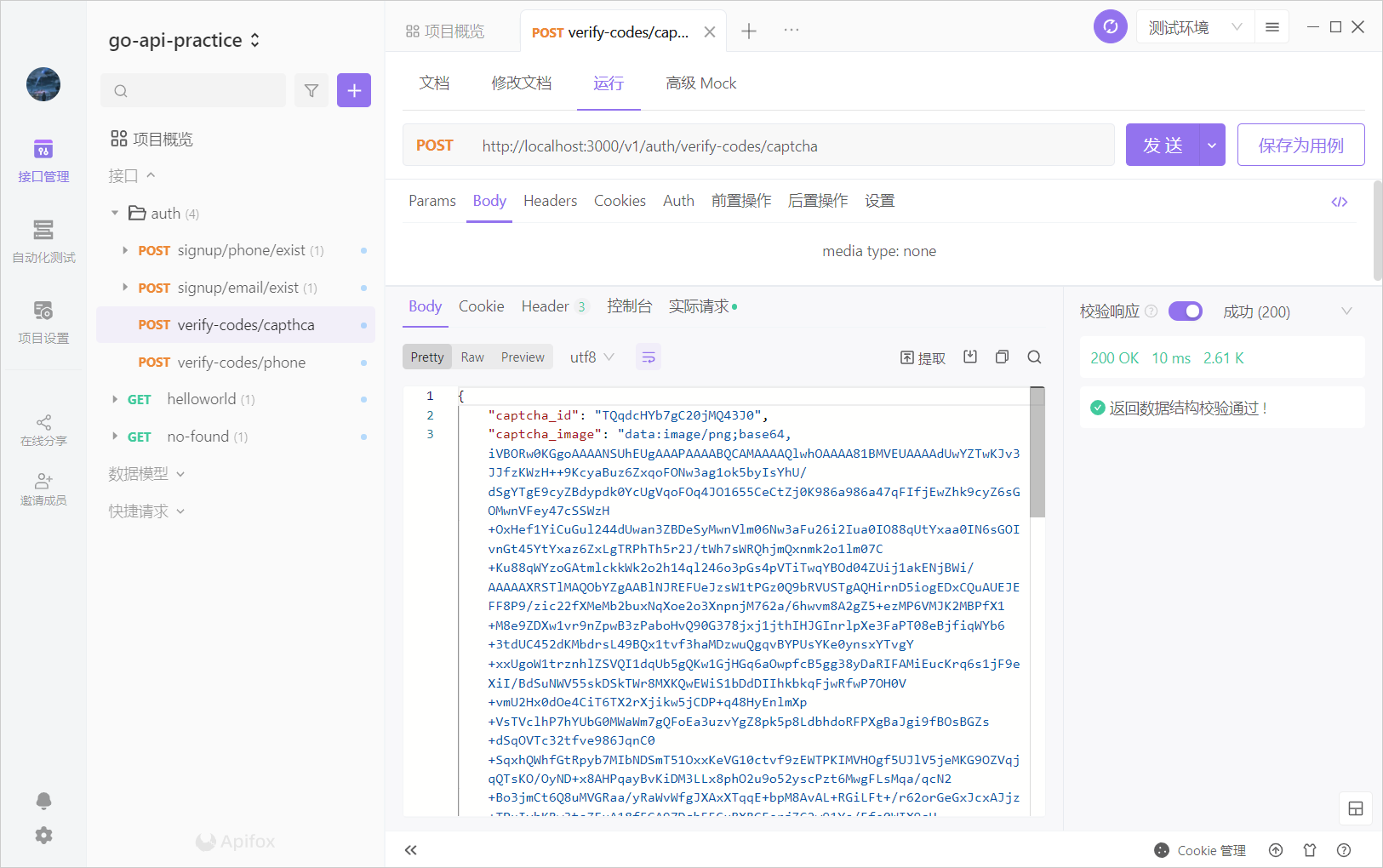
在apifox中建立接口

我们测试一下
我们把生成的base64码转换成图片
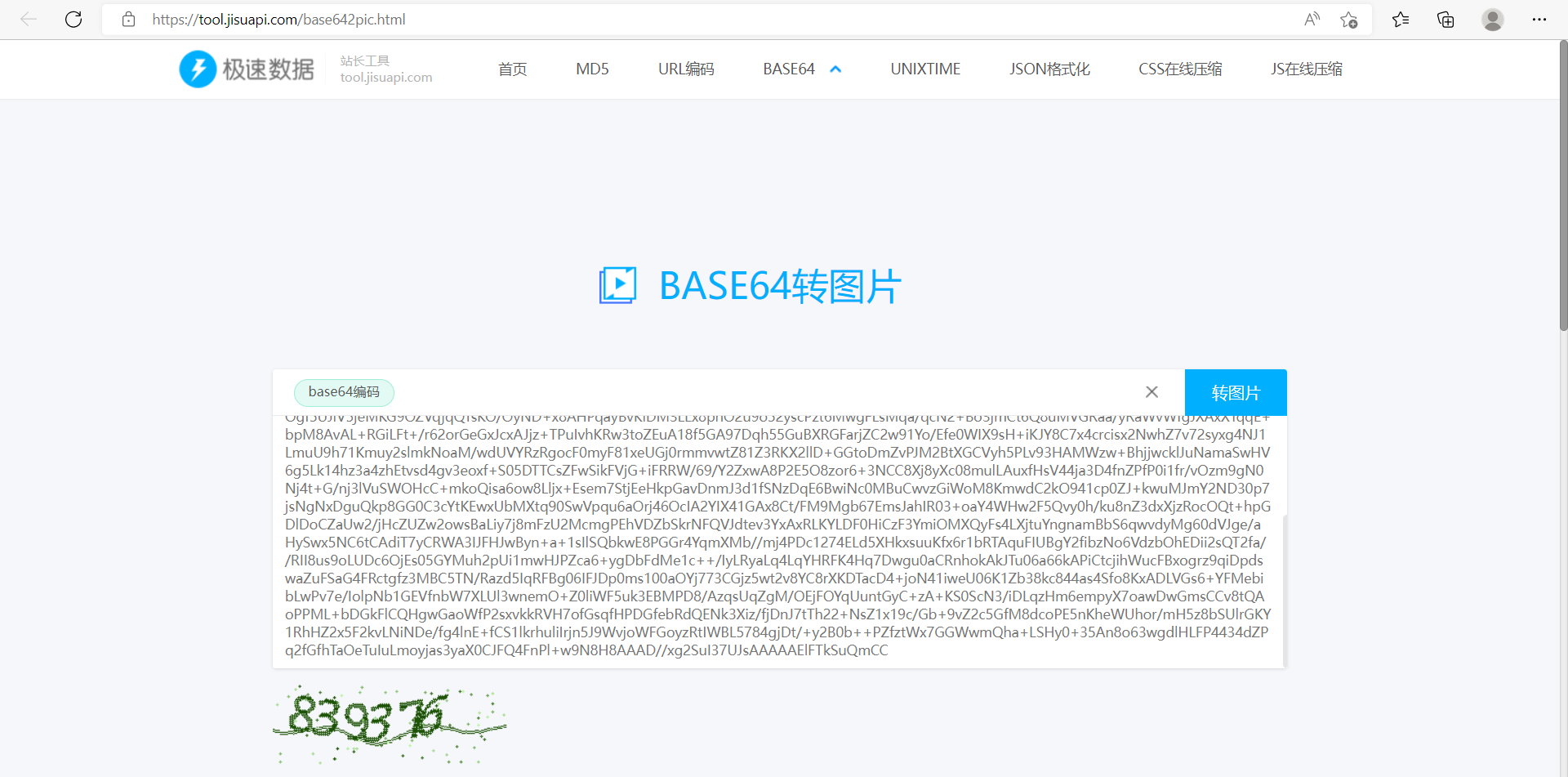
这样图片验证码接口就开发好了