(十一)利用阿里云平台发送短信
- 分类
- 未分类
文章目录 7 节
开始前的准备
$ go get github.com/KenmyZhang/aliyun-communicate
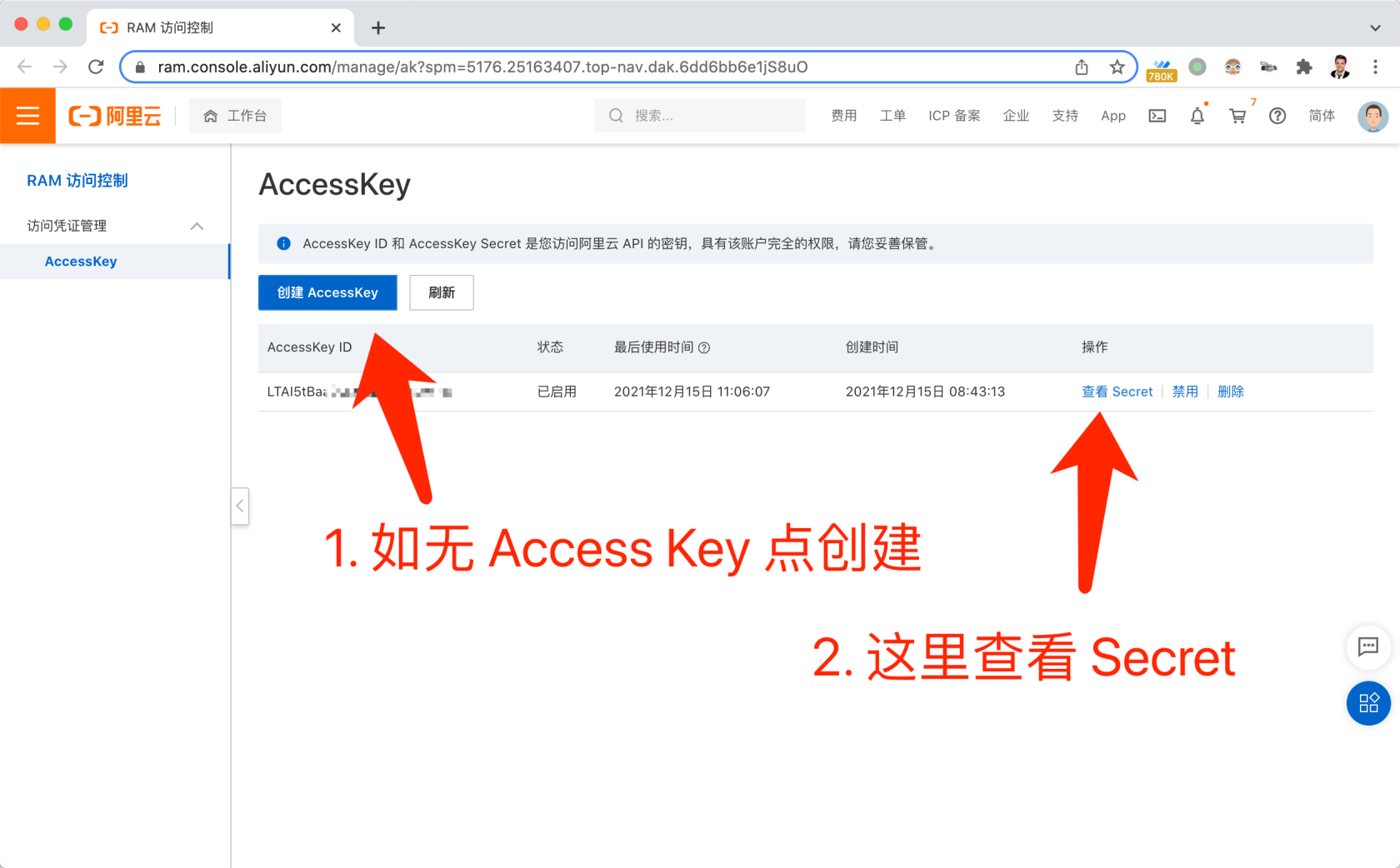
# 此外我们还需要在阿里云申请短信服务并且获取accesskey ID和accesskey secret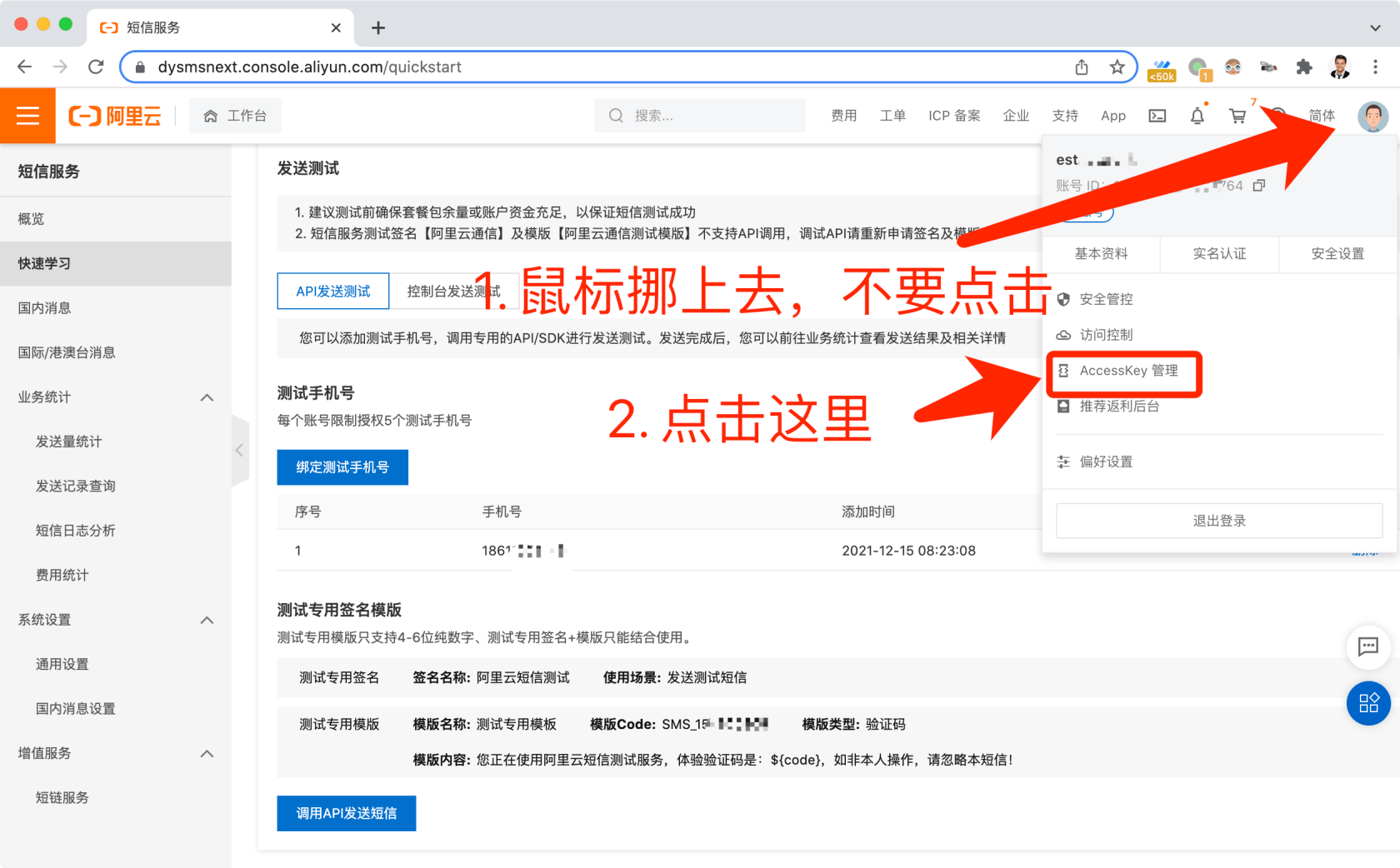
开始编码
封装sms
pkg/sms/driver_interface.go
package sms

type Driver interface {
   Send(phone string, message Message, config map[string]string) bool
}
pkg/sms/driver_aliyun.go
package sms

import (
   "encoding/json"
   aliyunsmsclient "github.com/KenmyZhang/aliyun-communicate"
   "go-api-practice/pkg/logger"
)

type Aliyun struct{}

func (s *Aliyun) Send(phone string, message Message, config map[string]string) bool {
   smsClient := aliyunsmsclient.New("http://dysmsapi.aliyuncs.com/")

   templateParam, err := json.Marshal(message.Data)
   if err != nil {
      logger.ErrorString("Aliyun sms error", "json.Marshal error", err.Error())
      return false
   }

   logger.DebugJSON("Aliyun sms", "config", config)

   result, err := smsClient.Execute(
      config["access_key_id"],
      config["access_key_secret"],
      phone,
      config["sign_name"],
      message.Template,
      string(templateParam),
   )

   logger.DebugJSON("Aliyun sms", "request", smsClient.Request)
   logger.DebugJSON("Aliyun sms", "result", result)

   if err != nil {
      logger.ErrorString("Aliyun sms error", "Execute error", err.Error())
      return false
   }

   resultJSON, err := json.Marshal(result)
   if err != nil {
      logger.ErrorString("Aliyun sms error", "json.Marshal error", err.Error())
      return false
   }

   if result.IsSuccessful() {
      logger.DebugString("Aliyun sms", "success", "")
      return true
   } else {
      logger.ErrorString("Aliyun sms", "error", string(resultJSON))
      return false
   }

}
pkg/sms/sms.go
package sms

import (
   "go-api-practice/pkg/config"
   "sync"
)

type Message struct {
   Template string
   Data     map[string]string
   Content  string
}

type SMS struct {
   Driver Driver
}

var once sync.Once

var internalSMS *SMS

func NewSMS() *SMS {
   once.Do(func() {
      internalSMS = &SMS{
         Driver: &Aliyun{},
      }
   })
   return internalSMS
}

func (sms *SMS) Send(phone string, message Message) bool {
   return sms.Driver.Send(phone, message, config.GetStringMapString("sms.aliyun"))
}我们先把阿里云的sms包封装成一个Send函数
验证手机验证码
在这里值得一提的是,我们要注意在整个用手机发送短信的过程中,有两个不同的验证码,由captcha生成的验证码和手机发送的验证码,这里我们先来完成验证手机验证码的逻辑
pkg/verifycode/store_interface.go
package verifycode

type Store interface {
   Set(id string, value string) bool
   Get(id string, clear bool) string
   Verify(id, answer string, clear bool) bool
}虽然是两个不同的验证码,但是处理逻辑是类似的,这里的接口和captcha中的Store实际上是一致的,接下来我们来实现这个接口
pkg/verifycode/store_redis.go
package verifycode

import (
   "go-api-practice/pkg/app"
   "go-api-practice/pkg/config"
   "go-api-practice/pkg/redis"
   "time"
)

type RedisStore struct {
   RedisClient *redis.RedisClient
   keyPrefix   string
}

func (s *RedisStore) Set(key string, value string) bool {
   ExpireTime := time.Minute * time.Duration(config.GetInt64("verifycode.expire_time"))

   if app.IsLocal() {
      ExpireTime = time.Minute * time.Duration(config.GetInt64("verifycode.debug.expire_time"))
   }

   return s.RedisClient.Set(s.keyPrefix+key, value, ExpireTime)
}

func (s *RedisStore) Get(key string, clear bool) (value string) {
   key = s.keyPrefix + key
   val := s.RedisClient.Get(key)
   if clear {
      s.RedisClient.Del(key)
   }
   return val
}

func (s *RedisStore) Verify(key string, answer string, clear bool) bool {
   value := s.Get(key, clear)
   return value == answer
}可以发现与captcha中的逻辑基本一致,最后再把这些函数封装到一个功能完善的包中
pkg/verifycode/verifycode.go
package verifycode

import (
   "go-api-practice/helpers"
   "go-api-practice/pkg/app"
   "go-api-practice/pkg/config"
   "go-api-practice/pkg/logger"
   "go-api-practice/pkg/redis"
   "go-api-practice/pkg/sms"
   "strings"
   "sync"
)

type VerifyCode struct {
   Store Store
}

var once sync.Once
var internalVerifyCode *VerifyCode

func NewVerifyCode() *VerifyCode {
   once.Do(func() {
      internalVerifyCode = &VerifyCode{
         Store: &RedisStore{
            RedisClient: redis.Redis,
            keyPrefix:   config.GetString("app.name") + ":verifycode:",
         },
      }
   })
   return internalVerifyCode
}

func (vc *VerifyCode) SendSMS(phone string) bool {
   code := vc.generateVerifyCode(phone)

   if !app.IsProduction() && strings.HasPrefix(phone, config.GetString("verifycode.debug_phone_prefix")) {
      return true
   }

   return sms.NewSMS().Send(phone, sms.Message{
      Template: config.GetString("sms.aliyun.template_code"),
      Data: map[string]string{
         "code": code,
      },
   })
}

func (vc *VerifyCode) CheckAnswer(key string, answer string) bool {
   logger.DebugJSON("验证码", "检查验证码", map[string]string{key: answer})
   if !app.IsProduction() &&
      (strings.HasSuffix(key, config.GetString("verifycode.debug_email_suffix")) ||
         strings.HasPrefix(key, config.GetString("verifycode.debug_phone_prefix"))) {
      return true
   }
   return vc.Store.Verify(key, answer, false)
}

func (vc *VerifyCode) generateVerifyCode(key string) string {
   code := helpers.RandomNumber(config.GetInt("verifycode.code_length"))

   if app.IsLocal() {
      code = config.GetString("verifycode.debug_code")
   }

   logger.DebugJSON("验证码", "生成验证码", map[string]string{key: code})

   vc.Store.Set(key, code)
   return code
}
if !app.IsProduction() &&
(strings.HasSuffix(key, config.GetString("verifycode.debug_email_suffix")) ||
strings.HasPrefix(key, config.GetString("verifycode.debug_phone_prefix"))) {
return true
}与前面验证captcha类似,这里我们对于特殊的邮箱和手机号,我们直接放行
验证captcha验证码
刚刚我们已经提过了,我们除了验证手机验证码,还要验证captcha验证码
package requests

import (
   "github.com/gin-gonic/gin"
   "github.com/thedevsaddam/govalidator"
   "go-api-practice/pkg/captcha"
)

type VerifyCodePhoneRequest struct {
   CaptchaID     string `json:"captcha_id,omitempty" valid:"captcha_id"`
   CaptchaAnswer string `json:"captcha_answer,omitempty" valid:"captcha_answer"`

   Phone string `json:"phone,omitempty" valid:"phone"`
}

func VerifyCodePhone(data interface{}, c *gin.Context) map[string][]string {
   rules := govalidator.MapData{
      "captcha_id":     []string{"required"},
      "captcha_answer": []string{"required", "digits:6"},
      "phone":          []string{"required", "digits:11"},
   }

   messages := govalidator.MapData{
      "captcha_id": []string{
         "required:请输入验证码",
      },
      "captcha_answer": []string{
         "required:请输入验证码",
         "digits:验证码长度必须是6位",
      },
      "phone": []string{
         "required:请输入手机号",
         "digits:手机号长度必须是11位",
      },
   }
   errs := validate(data, rules, messages)

   _data := data.(*VerifyCodePhoneRequest)
   if ok := captcha.NewCaptcha().VerifyCaptcha(_data.CaptchaID, _data.CaptchaAnswer); !ok {
      errs["captcha_answer"] = append(errs["captcha_answer"], "验证码错误")
   }
   return errs

}
我们从前端接受验证码和手机号并且验证它们
完成控制器
在我们完成之前的工具包之后,控制器就变得简洁了
func (vc *VerifyCodeController) SendUsingPhone(c *gin.Context) {
   request := requests.VerifyCodePhoneRequest{}

   if ok := requests.Validate(c, &request, requests.VerifyCodePhone); !ok {
      return
   }

   if ok := verifycode.NewVerifyCode().SendSMS(request.Phone); !ok {
      response.Abort500(c, "发送失败")
   } else {
      response.Success(c)
   }
}
最后我们在路由中注册
vcc := new(auth.VerifyCodeController)
authGroup.POST("/verify-codes/captcha", vcc.ShowCaptcha)
authGroup.POST("/verify-codes/phone", vcc.SendUsingPhone)
测试
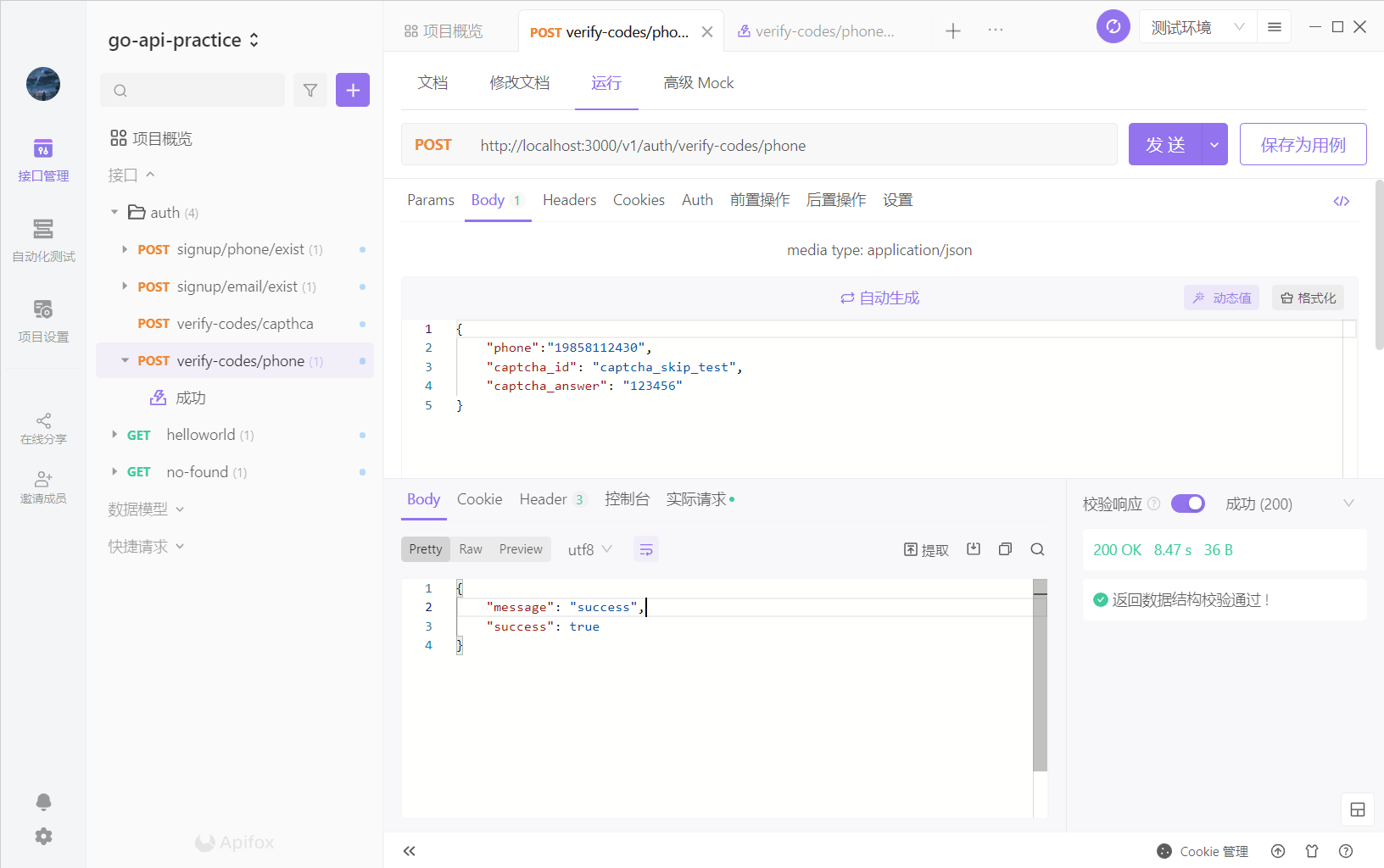
我们在apifox中创建接口,看看短信能否发送成功
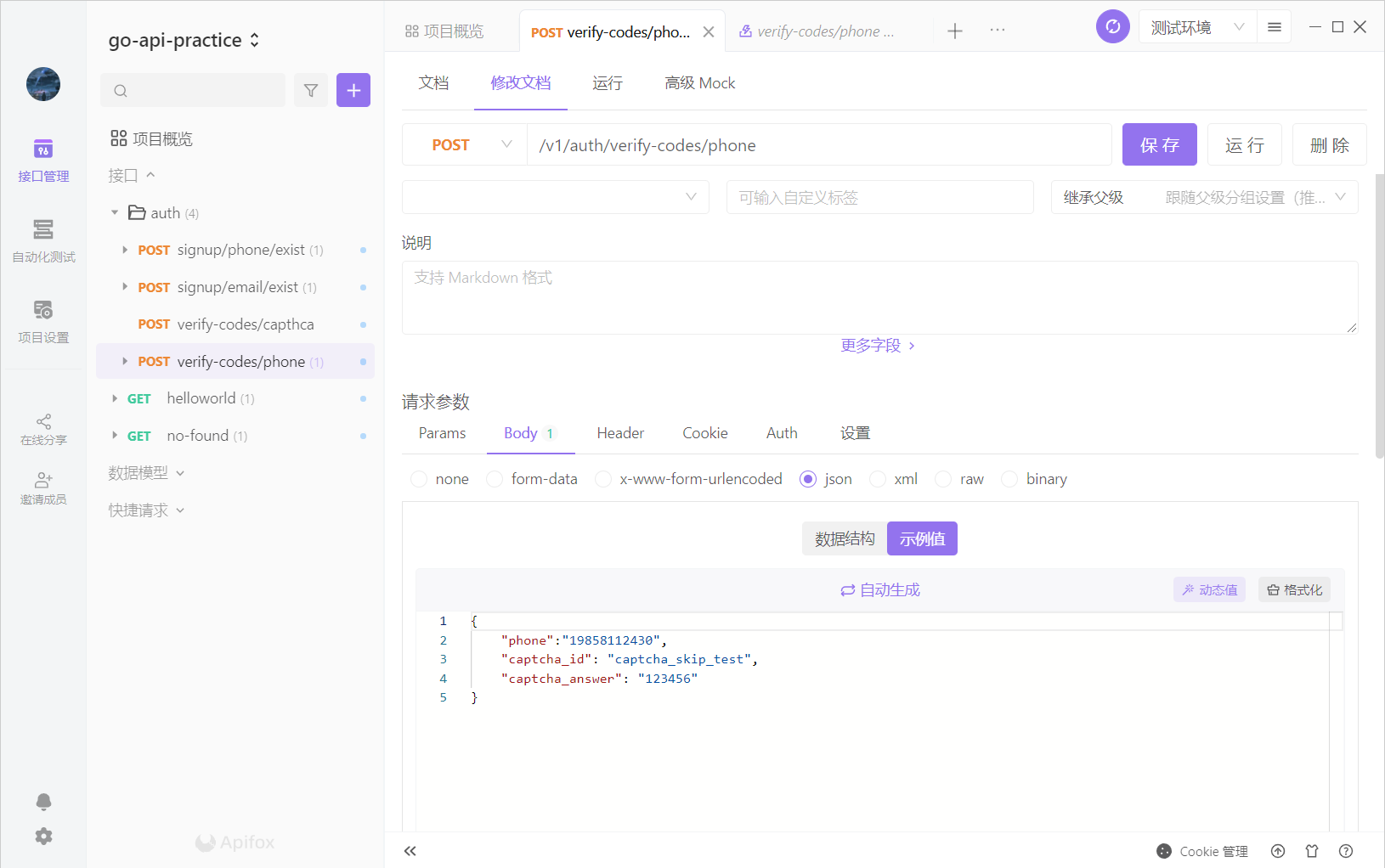
成功结果如下